
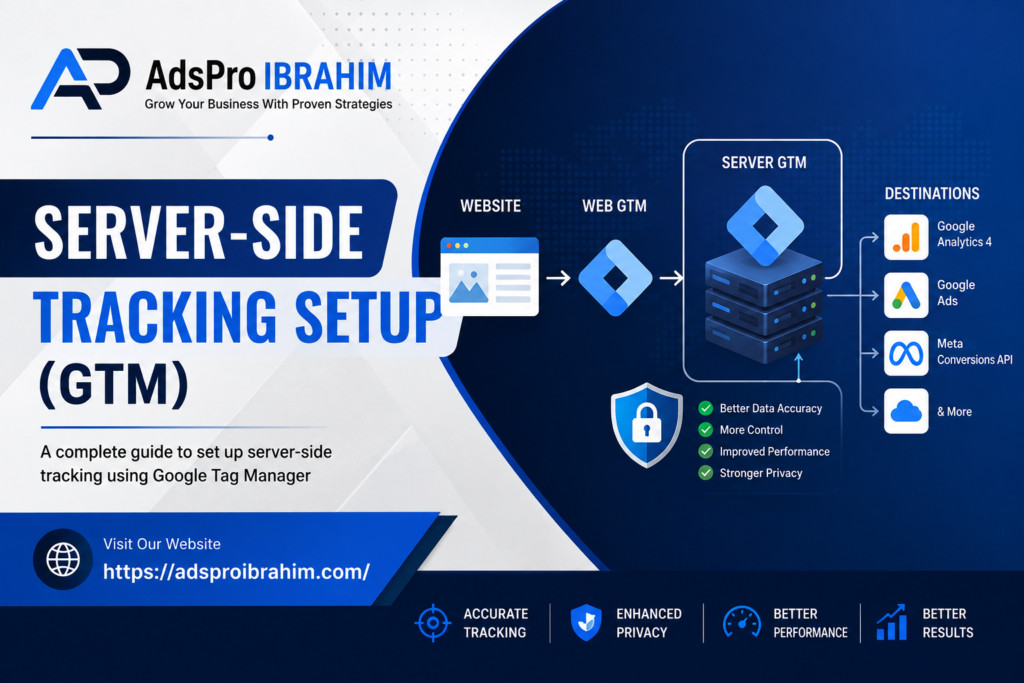
Server-Side Tracking Setup with Google Tag Manager (GTM): A Complete Guide
In today’s digital marketing environment, accurate tracking is more important than ever. Businesses rely on website analytics, conversion tracking, remarketing, and advertising platforms to understand what visitors do and which campaigns generate results. However, traditional browser-based tracking can become increasingly challenging because of browser restrictions, ad blockers, privacy controls, and the growing number of tracking technologies competing for attention.
That is where server-side tracking with Google Tag Manager (GTM) can make a significant difference.
Instead of sending every marketing request directly from a visitor’s browser to multiple third-party platforms, server-side tagging introduces a controlled server environment between the website and those platforms. Google explains that server-side tagging moves measurement processing from the browser to a server-side container, which can improve performance, data control, and privacy management.
For marketers, analysts, developers, and business owners, this approach can provide a more flexible foundation for modern measurement.
This comprehensive guide explains what server-side tracking is, how Google Tag Manager server-side tagging works, how to set it up, what tools you need, common mistakes to avoid, and how businesses can use it to improve their measurement strategy.
What Is Server-Side Tracking?
Server-side tracking is a measurement architecture where website or application data is sent to a server that processes and distributes the information to analytics and advertising platforms.
With traditional client-side tracking, JavaScript running in the visitor’s browser sends requests directly to services such as Google Analytics, advertising platforms, and other marketing tools. Every additional tracking script can contribute to browser workload and creates another direct connection between the visitor and an external platform.
Server-side tracking changes that architecture.
A typical server-side setup uses two Google Tag Manager containers:
- A Web GTM container on the website
- A Server GTM container hosted in a cloud environment
The web container captures relevant user interactions and sends requests to the server container. The server container then processes the incoming information and decides which destinations should receive the data. Google describes this as an intermediary endpoint that you control between the browser and third-party endpoints.
This distinction is important because server-side tracking does not simply mean “tracking without JavaScript.” Instead, it changes where much of the processing and routing takes place.
What Is Google Tag Manager Server-Side Tagging?
Google Tag Manager, commonly known as GTM, provides a framework for managing tags, triggers, and variables.
A standard web container runs in the visitor’s browser. A server container, on the other hand, operates on a server.
Google’s server-side tagging architecture allows marketers to process incoming requests before sending selected information to analytics and advertising platforms. The server container can also transform, validate, enrich, or remove information before it is forwarded.
In simple terms, the architecture looks like this:
Website → Web GTM → Server GTM → Analytics/Advertising Platforms
For example, a visitor might purchase a product on an ecommerce website.
The website records the purchase event. Instead of sending every destination request independently from the browser, the event can be sent to the server container. The server container can then route the appropriate information to Google Analytics, Google Ads, Meta, or another supported destination.
Consequently, your measurement architecture becomes more centralized and manageable.
Client-Side Tracking vs. Server-Side Tracking
Understanding the difference between these two approaches is essential before beginning an implementation.
Client-Side Tracking
In a traditional setup:
Visitor Browser → Website → Multiple Third-Party Platforms
The browser may load several scripts and send requests directly to different vendors.
This approach is relatively easy to implement, and for many websites it remains perfectly appropriate. However, large numbers of tags can increase browser activity, while privacy controls and browser restrictions can affect data collection.
Server-Side Tracking
With server-side tagging:
Visitor Browser → Website/Web GTM → Server GTM → Selected Platforms
The browser still participates in measurement, but the server becomes the central processing layer.
Google notes that server-side tagging can reduce the amount of code running in the browser and provide greater control over how data is processed and distributed.
Therefore, server-side tracking should generally be viewed as an extension or evolution of a tagging architecture rather than an automatic replacement for every client-side tag.
Why Businesses Are Moving Toward Server-Side Tracking
There are several reasons server-side measurement has become increasingly attractive.
Better Data Control
One of the biggest advantages is greater control over the information sent to external platforms.
Instead of allowing every vendor script to determine what information leaves the browser, your server container can act as a controlled processing layer.
For instance, you could receive an event containing several parameters and forward only the fields required by a particular advertising platform.
This can help create a more deliberate data governance process.
Improved Website Performance
Every browser-based tracking script consumes some resources.
Although individual scripts may appear insignificant, a website containing numerous marketing tags can accumulate additional network requests, JavaScript execution, and browser processing.
Server-side tagging can move some of that processing away from the browser. Google specifically identifies reducing client-side workload as one of the potential performance benefits of server-side tagging.
However, server-side tagging does not automatically make every website faster. Poor implementation, excessive requests, or an underpowered server can still create problems.
Therefore, performance should always be measured before and after implementation.
Better Data Quality
Browser environments are complicated.
Different browsers, devices, privacy settings, extensions, network conditions, and client-side scripts can influence data collection.
A server-side environment gives marketers an opportunity to validate and standardize event data before sending it to destinations.
Google notes that server-side tagging can help correct inconsistencies, validate event information, and remove unnecessary data before it reaches third-party endpoints.
Greater Privacy Control
Privacy is another important consideration.
When a server container operates within a first-party context, you can have more control over how information and cookies are handled.
Google recommends configuring a custom domain for the tagging server because this can improve cookie privacy and durability.
Nevertheless, server-side tracking does not automatically make a website compliant with privacy laws. Consent requirements, data minimization, legal obligations, and platform policies still need to be addressed separately.
What You Need Before Setting Up Server-Side Tracking
Before beginning implementation, prepare the necessary accounts and access.
You will typically need:
- A Google Tag Manager account
- A GTM web container
- A GTM server container
- A Google Analytics 4 property
- A GA4 web data stream
- Access to Google Cloud or another supported hosting environment
- A domain or subdomain for your tagging server
- DNS access
- Website development access
- Appropriate advertising platform accounts
- A clear measurement plan
For example, you might use:
analytics.example.com
as your server-side tagging endpoint.
The exact domain is up to you, but using your own domain or a suitable subdomain is strongly recommended for production implementations.
Step-by-Step Server-Side GTM Setup
Now let’s walk through the implementation process.
Step 1: Create Your Web GTM Container
First, make sure Google Tag Manager is installed on your website.
Your web container should be responsible for capturing the interactions you actually need.
Examples include:
- Page views
- Form submissions
- Button clicks
- Product views
- Add-to-cart events
- Checkout events
- Purchases
- Lead submissions
- Phone clicks
- Appointment requests
Before moving to server-side tracking, make sure your existing event structure is clean.
Server-side tagging cannot magically fix a poorly designed measurement strategy.
Step 2: Create a Server Container
Log in to Google Tag Manager and create a new container.
When selecting the target platform, choose:
Server
Google’s official setup process provides a server container specifically designed for server-side tagging.
Once created, GTM will provide options for deploying your tagging server.
Step 3: Deploy the Tagging Server
Google currently supports automatic provisioning through Google Cloud and also provides manual deployment options.
For many beginners, automatic provisioning is the simpler route.
Google’s automatic provisioning process can create a Google Cloud project and deploy a tagging server using Cloud Run.
Businesses with more advanced infrastructure requirements can use manual deployment or other supported environments.
However, server-side tracking introduces infrastructure responsibilities. You should consider:
- Server capacity
- Scaling
- Monitoring
- Security
- Availability
- Cost
- Updates
- DNS
- HTTPS
For production websites, infrastructure planning is just as important as GTM configuration.
Step 4: Configure Your Server Container URL
After deploying the server, you will receive a server URL.
For example:
Google recommends using a custom domain instead of relying solely on the default Cloud Run URL for production use.
You will need to configure DNS appropriately so that your chosen domain points to the tagging server.
This step usually requires access to your DNS provider.
Step 5: Connect the Website to the Server Container
Once the server container is available, your website needs to send measurement requests to it.
For GA4, Google supports the server_container_url configuration parameter.
In a Google tag configuration, the parameter points your measurement requests toward your server container rather than directly to Google’s collection endpoint.
The basic architecture becomes:
Website → Web GTM/Google Tag → Server Container URL → Server GTM
This is one of the most important parts of the implementation.
Step 6: Configure the GA4 Client
Server containers use a different concept called a Client.
A client receives incoming requests and transforms them into events that the server container can process.
Google’s server containers include a GA4 Client by default, which simplifies GA4 implementations.
The client essentially tells the server container how to interpret incoming requests.
Once the request has been interpreted, your server-side triggers and tags can work with the resulting event data.
Step 7: Configure Server-Side GA4 Tags
After configuring the client, create your GA4 tag within the server container.
The server-side GA4 tag determines where the processed event should go.
You can configure appropriate event parameters and destination settings according to your measurement requirements.
For example, a purchase event might contain:
- Transaction ID
- Value
- Currency
- Items
- Customer-related identifiers where permitted
- Event timestamp
- Relevant campaign information
Only collect and transmit information that is necessary and appropriate for the intended purpose.
Step 8: Configure Server-Side Advertising Tags
Once GA4 is working, you can consider other destinations.
Depending on your business and advertising strategy, server-side tagging may be used to support destinations such as:
- Google Ads
- Meta
- Other advertising platforms
- CRM systems
- Data warehouses
- Marketing APIs
Meta, for example, offers the Conversions API, which creates a direct connection between marketing data and Meta’s optimization and measurement systems.
The exact implementation depends on the platform and its current requirements.
Therefore, do not copy a generic configuration without checking the destination’s current documentation.
Server-Side Tracking for Google Ads
Google Ads conversion tracking is one of the most valuable applications of a robust measurement architecture.
For example, imagine you operate a lead-generation website.
A visitor:
- Lands on your website.
- Reads a service page.
- Clicks a CTA.
- Completes a form.
- Becomes a qualified lead.
Your measurement system should ideally capture that journey accurately.
Server-side processing can help centralize the event before forwarding relevant conversion information to advertising platforms.
However, conversion tracking should always be designed around your actual business goals.
Tracking hundreds of minor interactions does not necessarily improve advertising performance.
Instead, prioritize meaningful conversions such as:
- Purchases
- Qualified leads
- Phone calls
- Appointment bookings
- Quote requests
- Subscription completions
Server-Side Tracking for Meta
Meta’s Conversions API is another important example of server-based conversion measurement.
The system allows businesses to send marketing events from server-side sources, websites, apps, CRM systems, and other sources to Meta.
When implementing Meta server-side tracking, pay particular attention to event deduplication if browser and server events are both being sent.
Otherwise, the same conversion may potentially be counted more than once.
A strong implementation therefore requires:
- Consistent event names
- Reliable event IDs
- Correct timestamps
- Appropriate identifiers
- Consent management
- Deduplication logic
- Testing
Event Deduplication: Why It Matters
Suppose a purchase is sent through both browser-based tracking and server-side tracking.
Without an appropriate deduplication strategy, the advertising platform might interpret the two requests as two separate purchases.
That could create inflated conversion numbers.
A good measurement architecture therefore establishes a reliable event identity.
For example:
purchase_event_id = ORDER-12345
The same logical purchase can then be associated across the relevant tracking systems.
The exact implementation varies by platform, so always follow the destination’s current documentation.
Consent Management and Privacy
Server-side tracking should never be treated as a shortcut around user consent.
Moving data from the browser to a server does not remove privacy obligations.
Instead, server-side tracking can give you another layer for enforcing your data governance policies.
A well-designed system should consider:
- Consent status
- Data minimization
- Personally identifiable information
- Sensitive information
- Cookie behavior
- Retention policies
- Access controls
- Vendor requirements
- Regional regulations
For example, if a visitor has not granted the appropriate consent for a particular marketing purpose, your server-side configuration should respect that decision.
In other words, server-side tracking should support privacy—not undermine it.
First-Party Server-Side Tracking
One of the most valuable concepts in server-side GTM is the first-party context.
Suppose your website is:
example.com
You could configure a tagging endpoint such as:
analytics.example.com
This allows measurement requests to operate under your website’s domain structure.
Google recommends using a custom domain for the tagging server in production.
A first-party setup can provide stronger control over cookies and communication between your website and measurement infrastructure.
Additionally, Google’s documentation explains that first-party serving can help keep website data and cookies within your domain context, depending on implementation.
Testing Your Server-Side GTM Setup
Never publish a server-side implementation without testing it thoroughly.
Google Tag Manager provides Preview mode for server containers.
During testing, you should verify:
- Requests arrive at the server
- The correct client processes them
- Events contain the expected parameters
- Triggers fire correctly
- Server tags fire correctly
- Destination requests are successful
- Consent rules behave correctly
- Duplicate events are prevented
- Conversion values are accurate
Google’s documentation recommends using Preview mode to inspect requests and events before publishing the server container.
Test Real User Journeys
Do not test only individual events.
Complete realistic journeys.
For an ecommerce website, test:
Landing Page → Product View → Add to Cart → Checkout → Purchase
For a lead-generation website, test:
Landing Page → Service Page → CTA → Form → Thank You Page
This approach makes it easier to identify where data is lost.
Common Server-Side Tracking Mistakes
Server-side tagging is powerful, but implementation mistakes can reduce its value.
Mistake 1: Installing Server-Side GTM Without a Measurement Plan
Technology should support strategy.
Before creating containers, define the business questions you need to answer.
Mistake 2: Sending Everything
More data does not automatically mean better data.
Only send information that has a legitimate measurement purpose.
Mistake 3: Ignoring Consent
Server-side tracking is not an alternative to consent management.
Build privacy requirements into the architecture from the beginning.
Mistake 4: Forgetting Deduplication
If browser and server events are both used, establish a reliable deduplication strategy.
Mistake 5: Using Only the Default Server URL
For production environments, Google recommends configuring a custom domain.
Mistake 6: Not Monitoring Infrastructure
A server is infrastructure.
Therefore, monitor availability, traffic, errors, performance, and resource usage.
Mistake 7: Assuming Server-Side Tracking Is Free
While some Google Cloud configurations may fall within free-tier limits, costs can arise depending on traffic and infrastructure usage. Google notes that additional server capacity can create ongoing costs.
Consequently, businesses should estimate traffic and infrastructure requirements before deployment.
How Much Does Server-Side GTM Cost?
The cost depends on your architecture, traffic, hosting provider, configuration, and number of server instances.
Google’s automatic provisioning can start with a relatively small deployment, while higher-traffic production environments may require additional Cloud Run capacity.
Google recommends additional instances for redundancy when the server is receiving live traffic and notes that a minimum of three instances per container is recommended for redundancy in its current guidance.
Your actual monthly cost may therefore vary significantly.
For a small website, infrastructure expenses may be modest. A high-traffic ecommerce platform, however, can require a more robust deployment.
Does Server-Side Tracking Replace Google Analytics?
No.
Server-side GTM and Google Analytics serve different purposes.
Google Analytics remains an analytics platform.
Google Tag Manager is a tag management system.
Server-side GTM provides an environment where measurement data can be processed and routed.
Think of it this way:
GA4 = Analytics destination
GTM = Tag management
Server GTM = Server-side processing and routing layer
These technologies can work together rather than compete with one another.
Is Server-Side Tracking Worth It?
The answer depends on your business.
For a small website with limited tracking requirements, a conventional GTM implementation may be sufficient.
However, server-side tracking becomes increasingly attractive when you have:
- Significant advertising spend
- Ecommerce transactions
- Multiple advertising platforms
- Complex conversion tracking
- Privacy requirements
- Large numbers of marketing tags
- Data quality challenges
- Multiple data destinations
- A need for greater control over event routing
For businesses investing heavily in digital advertising, better measurement can have a meaningful impact on decision-making.
After all, advertising optimization is only as strong as the conversion data supporting it.
A Practical Server-Side GTM Implementation Strategy
For most businesses, a phased approach is safer than attempting to migrate everything simultaneously.
Phase One: Audit
Review your existing:
- GTM containers
- GA4 implementation
- Google Ads conversions
- Meta Pixel
- Conversion events
- Consent setup
- Cookies
- Data layer
- Marketing scripts
Phase Two: Measurement Planning
Create a documented event specification.
For every important event, define:
- Event name
- Trigger condition
- Parameters
- Data type
- Destination
- Consent requirement
- Deduplication requirement
Phase Three: Server Infrastructure
Create your server container and deploy the tagging server.
Configure:
- Cloud environment
- Custom domain
- HTTPS
- DNS
- Scaling
- Monitoring
Phase Four: GA4 Migration
Start with GA4 because it provides a useful foundation for validating server-side event flow.
Phase Five: Advertising Platforms
Once GA4 is functioning correctly, progressively configure important advertising destinations.
Phase Six: Validation
Compare your old and new measurement systems.
Look for:
- Event volume
- Conversion counts
- Revenue
- Event parameters
- Attribution differences
- Duplicate conversions
Phase Seven: Optimization
After deployment, continuously monitor and improve the architecture.
Server-side tracking is not a “set it and forget it” project.
Final Thoughts
Server-side tracking with Google Tag Manager represents an important development in modern digital measurement.
Instead of allowing every marketing platform to interact independently with the visitor’s browser, businesses can introduce a centralized server-side layer that provides greater control over data processing and routing.
When implemented correctly, server-side tagging can help reduce browser-side workload, improve data governance, support more controlled data flows, and create a scalable foundation for modern analytics and advertising measurement. Google specifically highlights performance, security, privacy controls, and data quality among the potential benefits of server-side tagging.
Nevertheless, successful implementation requires more than simply creating a server container.
You need a clear measurement strategy, properly structured events, appropriate consent controls, reliable infrastructure, careful testing, and ongoing monitoring.
For businesses that depend on accurate conversion data, especially ecommerce brands, lead-generation companies, and advertisers running multiple platforms, server-side tracking can be a valuable investment.
If your current tracking setup feels fragmented, conversion numbers do not match across platforms, or your website has accumulated too many client-side marketing tags, now may be the right time to evaluate a server-side GTM strategy.
The goal is not to collect more data.
The goal is to collect better data, control it responsibly, and turn it into better marketing decisions.
Build a Smarter Tracking Foundation
Digital advertising is becoming increasingly dependent on trustworthy first-party measurement and well-structured conversion data. Consequently, businesses should think beyond simply installing tracking codes.
A modern analytics architecture should answer three fundamental questions:
What happened?
Was the data collected correctly?
Can we trust the information enough to make business decisions?
Server-side GTM can help create the infrastructure needed to answer those questions.
With the right strategy, implementation, testing, and ongoing optimization, server-side tracking can become more than a technical upgrade—it can become an important part of a company’s overall digital marketing infrastructure.
For businesses looking to improve Google Analytics, Google Ads, Meta advertising, conversion tracking, and overall marketing measurement, a properly designed server-side GTM setup can provide a stronger foundation for long-term growth.
Turn Better Tracking Into Better Google Ads Performance
Your Google Ads campaigns are only as powerful as the data behind them.
If conversions are being missed, tracking is inconsistent, or your advertising platforms are receiving incomplete signals, even a carefully planned campaign can struggle to deliver its full potential. As discussed in our guide to server-side tracking, a properly structured Google Tag Manager (GTM), GA4, and conversion tracking setup can create a stronger foundation for reliable measurement and smarter advertising decisions.
Ready to Build a More Reliable Google Ads Strategy?
At Ads Pro Ibrahim, we help businesses build, configure, and manage Google Ads campaigns with a strong focus on accurate measurement, meaningful conversions, and sustainable performance.
Our Google Ads Setup & Management Services can help you move beyond simply running advertisements. We focus on creating a properly structured advertising ecosystem where your campaigns, conversion tracking, analytics, and business objectives work together.
From initial account and campaign setup to conversion tracking, GTM implementation, campaign optimization, and ongoing management, we can help ensure your advertising investment is guided by dependable data.
Our Google Ads Services Can Help With:
- Google Ads account and campaign setup
- Search, Display, Performance Max, and other campaign configurations
- Google Tag Manager implementation
- GA4 and Google Ads conversion tracking
- Server-side tracking strategy and implementation
- Conversion tracking audits and troubleshooting
- Lead and ecommerce conversion measurement
- Conversion value and event configuration
- Campaign structure and keyword strategy
- Ad copy and audience optimization
- Conversion-focused campaign optimization
- Performance monitoring and reporting
- Ongoing Google Ads management
Don’t Let Poor Tracking Waste Your Advertising Budget
If your Google Ads account is generating clicks but you are uncertain which campaigns, keywords, or ads are actually producing valuable customers, it may be time to review your tracking and campaign structure.
Let’s build a Google Ads system designed around accurate measurement, meaningful conversions, and measurable business growth.
Whether you are launching Google Ads for the first time, struggling with inaccurate conversion data, or looking to improve an existing campaign, our team can help identify opportunities and create a more effective strategy.
Start Your Google Ads Journey Today
Ready to turn your advertising data into actionable growth?
Contact Ads Pro Ibrahim today to discuss your Google Ads setup, conversion tracking, and ongoing campaign management requirements.
📱 WhatsApp Available: +880 1620 037746
☎️ Call: +880 1964 509363
✉️ Email: dmexpertibrahimkhan@gmail.com
📍 Location: Shonir Akhra, Dhaka, Bangladesh
Your competitors are already competing for your customers’ attention. Make sure your Google Ads campaigns are built to compete intelligently.
Contact Ads Pro Ibrahim today and let’s turn better tracking into better advertising performance.
Frequently Asked Questions
What is server-side tracking?
Server-side tracking is a measurement architecture in which website or application data is sent to a server before being processed and forwarded to analytics, advertising, or marketing platforms. Unlike traditional client-side tracking, where the browser communicates directly with multiple third-party platforms, server-side tracking introduces a controlled server layer between the website and those destinations.
What is Server-Side Google Tag Manager?
Server-Side Google Tag Manager, or Server-Side GTM, is a Google Tag Manager server container environment that receives incoming measurement requests, processes the data, and routes selected information to platforms such as Google Analytics, Google Ads, Meta, and other supported destinations.
How does Server-Side GTM work?
A typical implementation uses both a web container and a server container. The web container captures relevant user interactions and sends measurement requests to the server container. The server container then processes, transforms, validates, and routes the information to the appropriate platforms.
The basic architecture is:
Website → Web GTM → Server GTM → Analytics & Advertising Platforms
Does Server-Side GTM replace Web GTM?
No. Server-Side GTM generally works alongside Web GTM rather than completely replacing it. The web container remains responsible for capturing many user interactions, while the server container provides an additional processing and routing layer.
What is the difference between client-side and server-side tracking?
With client-side tracking, the visitor’s browser sends data directly to different analytics and advertising platforms. With server-side tracking, measurement requests can first pass through a server container that you control.
Server-side tracking can provide greater control over data processing, reduce some browser-side workload, and help businesses manage what information is forwarded to third-party platforms.
Can Server-Side GTM improve website performance?
It can potentially improve performance by moving some tracking-related processing away from the visitor’s browser and reducing certain client-side requests and scripts.
However, Server-Side GTM does not automatically make every website faster. The actual performance impact depends on the existing tagging architecture, implementation quality, server infrastructure, and traffic volume.
Can server-side tracking improve data accuracy?
Server-side tracking can help improve data quality because the server environment can validate, transform, standardize, and filter incoming event information before forwarding it to marketing platforms.
It is important to remember that server-side tracking cannot fix a poorly designed measurement strategy by itself. Events, parameters, triggers, and business objectives should be properly defined first.
Does server-side tracking make tracking completely reliable?
No tracking system is completely immune to data loss or discrepancies. Server-side tracking can provide a stronger measurement architecture, but accurate implementation, consent management, event configuration, deduplication, infrastructure, and ongoing testing are still essential.
What tools are required for a Server-Side GTM setup?
A typical setup may require a Google Tag Manager account, Web GTM container, Server GTM container, GA4 property and data stream, cloud hosting environment, a custom domain or subdomain, DNS access, website development access, advertising platform accounts, and a documented measurement plan.
Is Google Cloud required for Server-Side GTM?
Google provides automatic provisioning through Google Cloud and also supports manual deployment options. Google Cloud is therefore a common choice, particularly for businesses using Google’s recommended deployment process, but the appropriate hosting approach depends on the specific infrastructure and implementation requirements.
What is the role of Google Cloud Run in Server-Side GTM?
Google Cloud Run can be used to deploy and run the Server-Side GTM tagging server. Google’s automatic provisioning process can create a Google Cloud project and deploy the tagging server using Cloud Run.
Do I need a custom domain for Server-Side GTM?
For production implementations, using a custom domain or subdomain is strongly recommended. For example, a business might use analytics.example.com as its tagging endpoint.
A custom domain can support a first-party measurement architecture and provide greater control over how measurement requests and cookies operate within the website’s domain context.
What is a first-party server-side tracking setup?
A first-party server-side setup places the tagging endpoint under a domain or subdomain associated with your website. For example, if your website is example.com, you could use analytics.example.com for your server-side tagging endpoint.
This architecture can provide greater control over measurement requests and cookie handling compared with relying solely on third-party contexts.
Can Server-Side GTM be used with Google Analytics 4?
Yes. GA4 is one of the most common destinations for Server-Side GTM implementations. A GA4 Client in the server container can receive and interpret incoming GA4 requests, after which server-side GA4 tags can forward the appropriate event information to Google Analytics.
What is the GA4 Client in Server-Side GTM?
A Client in a Server-Side GTM container receives incoming requests and interprets them so that the server container can process the resulting event information.
Google’s server containers include a GA4 Client by default, making GA4 implementations easier to configure.
What is the server_container_url parameter?
The server_container_url parameter can be used in a GA4 or Google tag configuration to direct measurement requests toward your Server-Side GTM endpoint rather than sending them directly to Google’s collection endpoint.
This parameter is an important part of connecting the website’s measurement setup with the server container.
Can Server-Side GTM be used for Google Ads conversion tracking?
Yes. Server-side measurement can support Google Ads conversion tracking by providing a controlled processing layer for relevant conversion data.
For lead-generation businesses, important conversions may include qualified leads, phone calls, appointment requests, quote requests, and completed forms. For ecommerce businesses, purchases and transaction-related events may be particularly important.
Can Server-Side GTM be used with Meta?
Yes. Server-side implementations can work with Meta’s Conversions API and other supported marketing destinations.
When browser and server events are both being used, event deduplication becomes especially important to prevent the same conversion from being counted multiple times.
What is event deduplication?
Event deduplication is the process of ensuring that the same real-world conversion or interaction is not counted more than once when it is sent through multiple tracking channels.
For example, if a purchase is sent through both browser-based tracking and server-side tracking, a consistent event ID can help the receiving platform recognize that both events represent the same purchase.
Why is event ID important in server-side tracking?
An event ID can provide a consistent identifier for a specific conversion or interaction. When browser and server tracking are used together, a reliable event ID can help platforms match corresponding events and prevent duplicate conversions.
Does server-side tracking bypass cookies or privacy restrictions?
No. Server-side tracking should not be considered a method for bypassing privacy controls, cookie restrictions, or user consent requirements.
Moving tracking logic to a server does not eliminate privacy obligations. Businesses still need to follow applicable laws, consent requirements, data minimization principles, and advertising platform policies.
Is user consent still required with Server-Side GTM?
Where applicable, yes. Server-side tracking does not eliminate the need for appropriate consent management.
A properly designed implementation should consider consent status, personally identifiable information, sensitive information, cookie behavior, data retention, access controls, regional requirements, and individual advertising platform policies.
Is Server-Side GTM more privacy-friendly?
Server-side tracking can provide greater control over how data is processed and which information is forwarded to external platforms. It can also create an additional layer for enforcing data governance and data minimization.
However, simply moving tracking to a server does not automatically make an implementation privacy-compliant.
Can Server-Side GTM remove unnecessary data before sending it to advertising platforms?
Yes. One advantage of server-side processing is that information can potentially be filtered, transformed, or removed before it is forwarded to a particular destination.
This allows businesses to send only the information that is necessary and appropriate for a specific measurement purpose.
Does Server-Side GTM collect more data?
Not necessarily. The goal of server-side tracking should not be to collect as much information as possible.
A strong implementation focuses on collecting better-quality, purposeful data and controlling how that data is processed and distributed.
How much does Server-Side GTM cost?
The cost varies depending on website traffic, hosting configuration, server instances, implementation complexity, scaling requirements, and infrastructure needs.
Small websites may have relatively modest infrastructure costs, while high-traffic ecommerce websites may require more server capacity and redundancy. Businesses should estimate their expected traffic and infrastructure requirements before deployment.
Is Server-Side GTM free?
The GTM software itself does not mean that the complete server-side infrastructure is cost-free. Hosting and infrastructure expenses can arise depending on traffic and server requirements.
For example, Google Cloud usage can create costs as traffic and resource consumption increase.
How long does Server-Side GTM setup take?
The implementation timeline depends on the complexity of the website, number of conversions, advertising platforms, existing GTM and GA4 configuration, consent requirements, infrastructure, and testing requirements.
A simple website may be relatively straightforward, while a complex ecommerce website with multiple advertising platforms can require substantially more planning, configuration, and validation.
Is Server-Side GTM suitable for small businesses?
It can be, but it is not necessary for every small business. A website with limited traffic and straightforward tracking requirements may be adequately served by a well-configured client-side GTM setup.
Server-side tracking becomes more attractive when a business has significant advertising activity, complex conversion tracking, multiple platforms, substantial data-quality challenges, or more advanced measurement requirements.
Who benefits most from Server-Side GTM?
Server-side tracking can be particularly valuable for ecommerce businesses, lead-generation companies, businesses running multiple advertising platforms, organizations with complex conversion tracking, and companies that need greater control over their measurement infrastructure.
Businesses investing heavily in digital advertising may benefit significantly from having more reliable and controlled conversion data.
Can Server-Side GTM track ecommerce purchases?
Yes. Server-side tracking can support ecommerce events such as product views, add-to-cart actions, checkout events, and purchases.
For purchase tracking, important information may include transaction ID, value, currency, items, timestamp, campaign information, and other permitted identifiers. Only appropriate and necessary information should be transmitted.
Can Server-Side GTM track leads and form submissions?
Yes. Server-side measurement can support lead-generation events such as form submissions, qualified leads, appointment requests, quote requests, and other meaningful business conversions.
The implementation should focus on business-critical conversions rather than attempting to track every minor interaction.
What events can be tracked through a Server-Side GTM architecture?
Depending on the website and measurement strategy, events can include page views, button clicks, form submissions, product views, add-to-cart events, checkout events, purchases, phone clicks, appointment requests, and lead submissions.
The exact event structure should be determined by the business’s measurement objectives.
Can Server-Side GTM fix incorrect conversion tracking?
It can help improve the architecture, but it cannot automatically fix every tracking problem.
If conversion events are incorrectly defined, triggers are misconfigured, data layer information is missing, or business goals are unclear, those problems should be corrected before or during the server-side implementation.
How should Server-Side GTM be tested?
Server-Side GTM should be thoroughly tested before being published to production. GTM Preview mode can be used to inspect incoming requests, clients, events, triggers, server-side tags, and destination requests.
Testing should also verify consent behavior, duplicate prevention, conversion values, and event parameters.
Should I test complete customer journeys?
Yes. Testing individual events is useful, but complete user journeys provide a more realistic validation of the tracking system.
For ecommerce, this could involve Landing Page → Product View → Add to Cart → Checkout → Purchase.
For lead generation, it could involve Landing Page → Service Page → CTA → Form → Thank You Page.
What are the most common Server-Side GTM mistakes?
Common mistakes include implementing server-side tracking without a measurement plan, sending unnecessary data, ignoring consent requirements, failing to configure deduplication, relying only on a default server URL for production, neglecting infrastructure monitoring, and assuming server-side tracking has no ongoing cost.
Do I need technical knowledge to implement Server-Side GTM?
A basic implementation can be learned with appropriate documentation and experience, but production deployments often involve GTM configuration, DNS, cloud infrastructure, domains, HTTPS, data layers, analytics, conversion tracking, consent management, and debugging.
For complex websites or advertising environments, professional implementation can reduce configuration errors and make testing and maintenance easier.
What should I monitor after Server-Side GTM is launched?
Ongoing monitoring should include server availability, traffic, errors, performance, resource usage, event volumes, conversion counts, revenue, event parameters, attribution differences, and duplicate conversions.
Server-side tracking should be treated as an ongoing measurement system rather than a one-time installation.
Does Server-Side GTM replace Google Analytics?
No. Google Analytics, Google Tag Manager, and Server-Side GTM perform different functions.
GA4 is an analytics platform, GTM is a tag management system, and Server-Side GTM provides a server-side processing and routing environment. They can work together as part of a broader measurement architecture.
Is Server-Side GTM better than client-side tracking?
Neither approach is universally better. Client-side tracking remains useful for many website interactions, while server-side tracking can provide additional control, data processing capabilities, and potentially reduced browser-side workload.
For many businesses, the strongest architecture combines client-side and server-side measurement rather than treating them as competing technologies.
Should every website implement Server-Side GTM?
No. Businesses should evaluate their traffic, advertising spend, conversion requirements, number of marketing platforms, privacy needs, technical infrastructure, and budget before deciding whether server-side tracking is appropriate.
What is the best way to migrate to Server-Side GTM?
A phased migration is generally a practical approach. Businesses can begin by auditing their existing GTM, GA4, Google Ads, Meta Pixel, conversion events, consent setup, cookies, data layer, and marketing scripts.
They can then create a measurement plan, deploy the server infrastructure, migrate GA4, add advertising destinations, validate the results, and continuously optimize the implementation.
Is Server-Side GTM a set-it-and-forget-it solution?
No. A successful server-side tracking setup requires ongoing monitoring, testing, maintenance, and optimization.
Changes to websites, advertising platforms, privacy requirements, APIs, cloud infrastructure, and measurement strategies can all affect the implementation over time.
Why is server-side tracking important for Google Ads?
Google Ads optimization depends heavily on conversion data. If important conversions are missing, duplicated, incorrectly attributed, or poorly configured, campaign decisions can be affected.
A properly designed server-side measurement architecture can provide a stronger foundation for collecting, validating, and routing important conversion information to advertising platforms.
When should a business consider implementing Server-Side GTM?
A business should consider evaluating Server-Side GTM when it has significant advertising spend, ecommerce transactions, multiple advertising platforms, complex conversion tracking, privacy requirements, numerous marketing tags, data-quality problems, or a need for greater control over event routing.
The decision should ultimately be based on the company’s measurement objectives and technical requirements rather than simply following a trend.
What is the main goal of Server-Side GTM?
The primary goal is not simply to collect more data. It is to create a more controlled and reliable measurement architecture that can process useful information responsibly and deliver better-quality data to analytics and advertising platforms.
When implemented strategically, Server-Side GTM can become an important foundation for Google Analytics, Google Ads, Meta advertising, conversion tracking, and broader digital marketing measurement.
External Resources
- For an authoritative overview of Server-Side GTM, you can refer readers to Google’s official documentation, which explains how server-side tagging works, its benefits, and the infrastructure required for implementation. Google Tag Manager — Server-Side Tagging Documentation
- For a deeper understanding of the architecture, Google’s official introduction to server-side tagging explains how clients, tags, triggers, and variables work together within a server container. Google’s Introduction to Server-Side Tagging
- If you are configuring GA4 with Server-Side GTM, Google provides official guidance on sending website data to a server-side Tag Manager container and using the
server_container_urlconfiguration. Google’s Guide to Sending Data to Server-Side Tag Manager - For businesses implementing Google Ads conversion tracking through Server-Side GTM, Google provides an official setup guide covering the required web and server container configuration. Google Ads Conversion Tracking with Server-Side GTM
- For advanced Google Ads conversion measurement, Google’s Enhanced Conversions documentation explains how hashed first-party customer data can supplement existing conversion tracking to improve measurement accuracy. Google Ads Enhanced Conversions Documentation
- For businesses comparing traditional and server-side implementations, Google’s official comparison explains the differences between client-side and server-side tagging and when server-side tagging may be appropriate. Client-Side vs. Server-Side Tagging — Google Tag Manager Help
- For organizations considering custom infrastructure, Google’s manual setup documentation explains how Server-Side GTM can be deployed outside the automatic Google Cloud provisioning process. Google’s Manual Server-Side GTM Setup Guide
- For advanced implementations and custom server-side tags, Google provides documentation explaining how server tags receive, transform, and forward event data to external destinations. How to Build a Server-Side Tag — Google Developers
Internal Resources
- If you have a GA4 service page:
“Before implementing Server-Side GTM, it is important to have a properly configured analytics foundation, so learn more about our Google Analytics 4 Setup Service for a complete measurement strategy.” - For your GA4/GTM guide:
“If you are new to Google Analytics 4 implementation, our Google Analytics 4 Setup with Google Tag Manager guide explains how GA4 and GTM can work together to create a reliable tracking foundation.” - For your Google Ads service page:
“Once your tracking infrastructure is properly configured, accurate conversion data can play a critical role in campaign performance, which is why our Google Ads Setup and Management Services can help businesses build and manage data-driven advertising campaigns.” - For your Google Ads tracking content:
“If your goal is to improve the accuracy of Google Ads conversion measurement, explore our related resources on Google Ads Tracking and Conversion Setup to better understand how tracking supports campaign optimization.” - For your GTM-related content:
“Businesses looking to strengthen their overall tracking infrastructure can also explore our Google Tag Manager resources for practical guidance on implementing and managing website measurement.” - For your GA4 and conversion tracking services:
“Server-side tracking works best when it is built on a clearly defined measurement strategy, so you can also explore our GA4 and Conversion Tracking Services for additional support.” - For a general digital marketing service page:
“Accurate tracking is only one part of a successful digital marketing strategy, so visit our Digital Marketing Services to discover how measurement, advertising, and optimization can work together.” - For a Google Ads management page:
“Reliable conversion tracking gives advertisers better data for campaign decisions, and our Google Ads Management Service can help turn that data into a more structured and measurable advertising strategy.”